
How to prepare for a virtual speed dating event
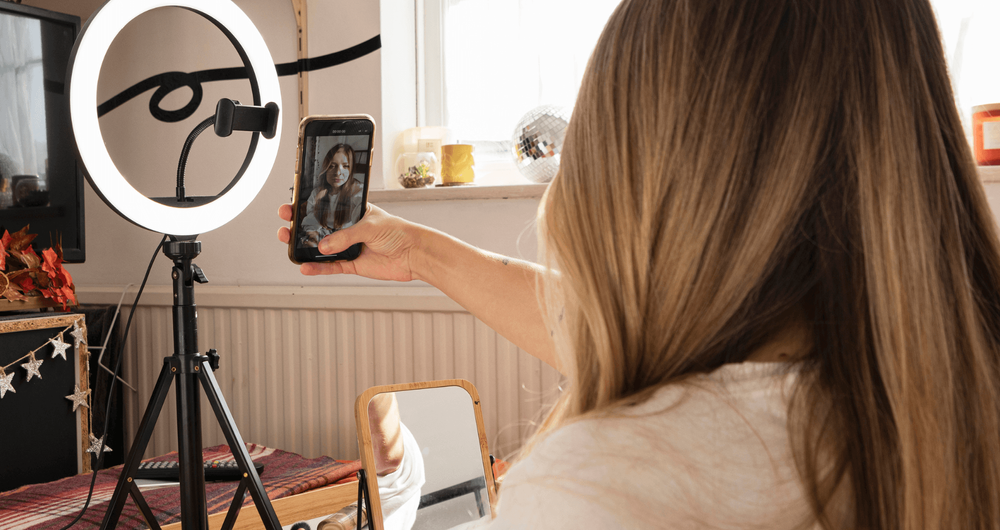
If you were going out for a first date you’d make an effort to impress. The same rules apply to a virtual event — except now the camera, the lighting and the room behind you are doing as much of the work as you are. This page walks you through the prep so you arrive looking and sounding the way you’d want to.
If you haven’t done a Fanciful event before, the format is the same as in person — just longer rounds — and What to expect at a speed dating event covers how the night runs. The questions in 40 great speed dating questions to ask and 10 thoughtful questions for getting to know someone work just as well on camera.
The day before#
Half an hour the day before saves you frantic problem-solving five minutes before the event:
- Test your kit. Use the test feature on your video conferencing app, or just open the camera app on your laptop or phone. Confirm picture and sound work.
- Update. Apply any pending browser or app updates so they don’t pop up mid-round.
- Check the link. Open the event link from your Fanciful confirmation email in the browser you’ll use on the night. Make sure it actually opens.
- Pick your clothes. Don’t leave this for ten minutes before. See the wardrobe notes below.
- Charge everything. Phone, laptop, headphones if you’ll need them.
Your space#
Choose a quiet, well-lit location in your home where you can have privacy and minimal distractions. If you live with others, make sure no one is going to walk in and interrupt you, and that you’re somewhere without too much background noise — you don’t want the washing machine going into a full spin at a critical moment.
Avoid cafes, public transport and public spaces unless peace and quiet is guaranteed.
Make sure your background area is tidy and free from any personal or sensitive information, photos, drying washing or general clutter.
Backdrop options that work well on camera:
- A plain wall. Neutral tones — white, beige, light grey — flatter most people.
- A bookshelf. Tidy, well-organised shelves make an interesting backdrop without competing for attention.
- Plants or artwork. One or two pieces add personality without distracting.
- A portable backdrop screen. Cheap and effective if your room won’t cooperate.
Lighting#
Good lighting is what separates a clear, vibrant, flattering image from a dim one. Natural light from a window is ideal — face it, don’t sit with your back to it. If natural light isn’t available, use soft, diffused light from a lamp or two, positioned in front of you slightly to one side.
Avoid harsh overhead lighting or any light source directly behind you — they’ll create unflattering shadows or turn you into a silhouette.
It’s well worth a few minutes on YouTube searching “webcam lighting” before your first event. It doesn’t take much to dramatically improve how the camera sees you, and it pays dividends.
Camera setup#
Position your webcam or camera straight on at eye level. This gives the most natural perspective and avoids odd angles.
- Laptop with built-in webcam: stack it on books or use a stand to bring the camera up to eye level. Looking down at a laptop is rarely flattering.
- Phone: use a stand. Shaky handheld virtual speed dates show a lack of care and preparation — and you’ll risk making your dates a bit motion-sick from all the camera movement.
Before the event starts, open the camera preview and check the framing. Your head and shoulders should fill a comfortable amount of the frame — not a tiny dot in the middle, not a close-up of one nostril.
Audio#
- Set your microphone level so you’re clearly audible without shouting.
- It’s much better to join the event without headphones if you can — laptop or external speakers usually work fine in a quiet room.
- If you must wear headphones, use small, wireless earbuds (AirPod-style). They’re discreet.
- Don’t use a gaming-style headset for virtual dating. It’s not the look.
What to wear#
You’d make an effort if you were meeting someone in real life — do the same for the virtual event. Wear what you feel most attractive in, and groom yourself the way you would for an in-person night.
A few things to never do — and we cannot stress this enough:
- Never join in a dressing gown or anything else that could be regarded as not fully clothed. You’ll get yourself banned PDQ.
- Never join from your bed. It’s weird, frankly rather pervy, and deeply unpleasant for the people you’re meeting. Expect to be skipped.
- All Fanciful interactions are recorded for safety and monitoring purposes. Behaviour that crosses the line will be reviewed.
The 10-minute pre-event check#
Run through this list in the ten minutes before the event opens:
- Backdrop tidy and uncluttered.
- Lights on, window facing you, no harsh overheads.
- Camera at eye level, framing checked in preview.
- Microphone tested — say a sentence and listen back if you can.
- Phone on silent, notifications off on your laptop.
- Drink of water in reach for the dry throat that comes from talking.
- Yourself: dressed, groomed, sitting upright.
- Event link open and ready to join when the host opens the room.
What to avoid (the quick list)#
- Joining from bed, the sofa slumped over, or the kitchen mid-cooking.
- Smoking, vaping or eating on camera.
- A noisy household behind you. Tell anyone you live with you’ll be busy.
- Gaming headsets, virtual backgrounds that flicker around your shoulders, or filters that distort your face.
- Anything that looks like you didn’t really try.
If something breaks mid-event#
It happens. If your camera, mic or connection fails during a round:
- Don’t panic. Drop out and rejoin — most platforms put you back into the rotation when you do.
- If you can’t get back in, the event host will see you’ve disconnected and can help.
- Let your match know briefly via the Fanciful event chat afterwards if it cost you a round; they’ll understand.
And finally#
Your appearance and backdrop should enhance your online presence, not distract from it. A bit of preparation goes a long way. Set the scene properly and the conversation can do the actual work.
When the event is over, head back to Fanciful and log your picks against your scorecard — What to expect at a speed dating event covers that step.
Good luck.